

Table of Contents
Content collaboration is the process by which writers, editors, reviewers, and stakeholders work together to plan, create, and publish content. This process of content creation process involves defined workflows, clear roles, and shared tools that keep everyone aligned from ideation to publication. This results in faster output, fewer revision cycles, and higher content quality.
As content defines the identity of a brand and relays its value proposition to its target audience, it is crucial to make the content creation collaboration process streamlined and efficient.
Why content collaboration is important
Content collaboration, on the surface, is how various members of the content team interact with one another. However, it’s more than that. Here are four benefits of content collaboration.
1. Save time and increase productivity
Content collaboration platforms help team members stay connected with relevant persons to streamline content creation. It ensures that the correct information is passed on to the right team member to develop useful content.
It also helps team members to understand their roles and responsibilities in different phases of the content production workflow. For instance, the reviewer should make suggestions but their approval depends on the editor and the author.
2. Improve employee engagement
Employee engagement is a qualitative metric with quantifiable parameters that describes the relationship between an employee and their organization. One of the parameters that contribute to its assessment is the work environment.
Content collaboration tools break barriers in any kind of work environment (in-office or remote) and improve the quality of interactions between team members. This, apart from making employees productive, makes them feel valued leading to better engagement.
3. Produce better content
The best content collaboration example is when team members share actionable feedback with each other which creates better content faster.
Every member of the content team has valuable insights that will add to the end product. However, those insights need to be shared at the right phases of the process and at the right time.
For instance, the marketer should share their thoughts on the CTA section after the initial outline of the draft is approved. The content collaboration process enforces this sequence of action.
4. Establish trust and transparency
Content collaboration helps content teams remain updated about the state of each content piece at all times. The best content collaboration tools also allow everyone direct access to content marketing data that keeps everyone on the same page.
There are two key benefits of this. One, this helps evolve the content production workflow in the right direction. Two, it improves the bonding between the members of the content team.
All the above benefits of content collaboration save resources such as time, money, and effort while producing stellar content.
Fortunately, you can get them all by following the steps below.
How to ensure effective content collaboration
Whether you are a small team or a large enterprise, you can use the tips below to create and maintain an effective content collaboration process.
1. Build a content production workflow
A content production workflow consists of various phases that carry a content piece from ideation to publication. This will standardize the content creation process which will give you and your team a baseline.
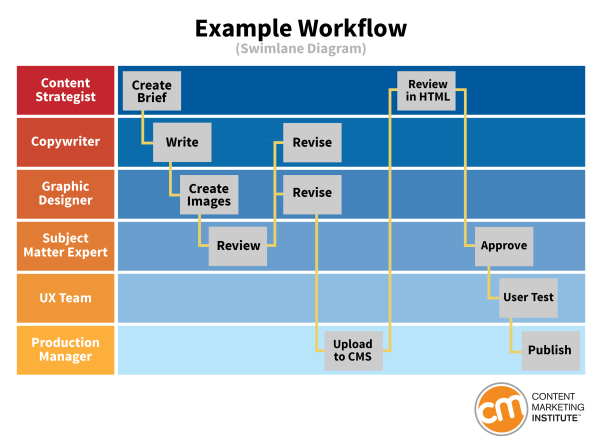
Usually, the steps are ideation, keyword research, outlining, writing, graphic designing, reviewing, editing, approval, and publishing. While building this process, you can determine things like brand tone, the standard of writing, etc.
The most important thing that you will achieve during this process is defining the roles and responsibilities of each team member facilitating better content-creator collaboration.
If you’re building this from scratch, our editorial workflow guide walks through each stage in detail.
2. Empower team members to participate in decision-making
One of the benefits of content collaboration we mentioned above is trust between the team members. The first thing you need to do for that is to get rid of siloed work structure where a team is instructed on how to create content.
The best content production workflow is the one that is created collaboratively by every contributing team member. Hence, to establish trust within the team and to build the best workflow, you should empower your team members to participate in decision-making.
Your content collaboration process should encourage team members to share their insights and suggestions from data and experience that will improve the overall process.
This brings us to our next tip.
3. Ensure data sharing is done correctly and securely
A content production workflow that is guided by data will continue to produce quality content while incorporating new changes in requirements. Therefore, you should make that relevant data easily accessible to your team members.
Data such as the time taken to publish content from scratch, the performance of past pieces, and the money and effort required to create new content will give direction to the content team for improving the overall workflow.
Based on your objectives, you should track the corresponding data:
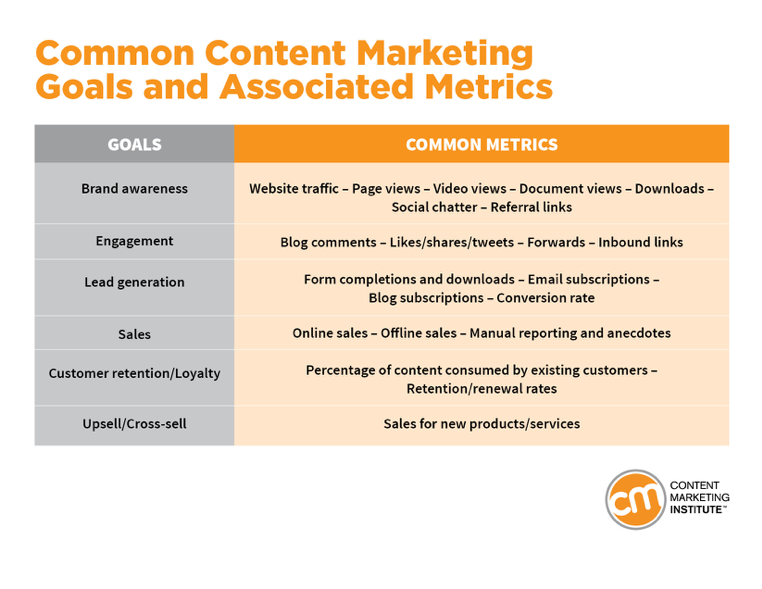
To collect and share accurate data securely, you need the right personal and enterprise content collaboration and messaging tools, which brings us to our final tip.
4. Use the right tools and plugins
Everything we shared above depends on whether the tools and plugins used by your team allow it. For example, if you want your team to be aware of how the past content pieces are performing, you should allow access to relevant dashboards in Google Analytics.
As the requirements of modern content teams are increasing, it is crucial to have the right tools which will not only get the job done but will also keep the workflow lean and efficient. Also, you should choose the content collaboration platform and tools that your team is comfortable with.
One such tool is Multicollab.
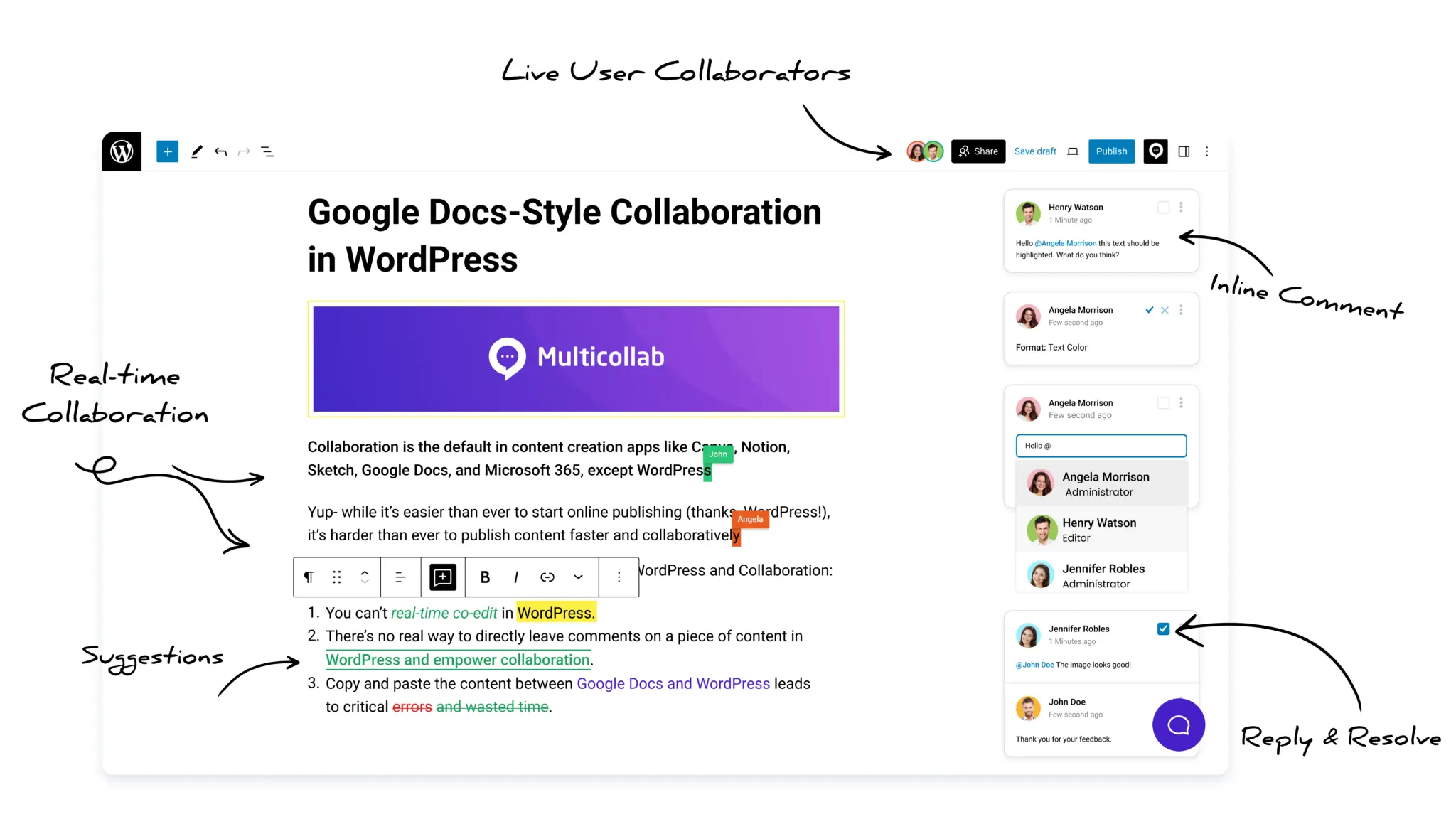
Multicollab is a WordPress content collaboration tool that allows content teams to collaboratively edit articles on the Gutenberg Editor just as they do in Google Docs and Microsoft Word. You can comment, suggest changes, and tag others on all types of content including videos and dynamic blocks.
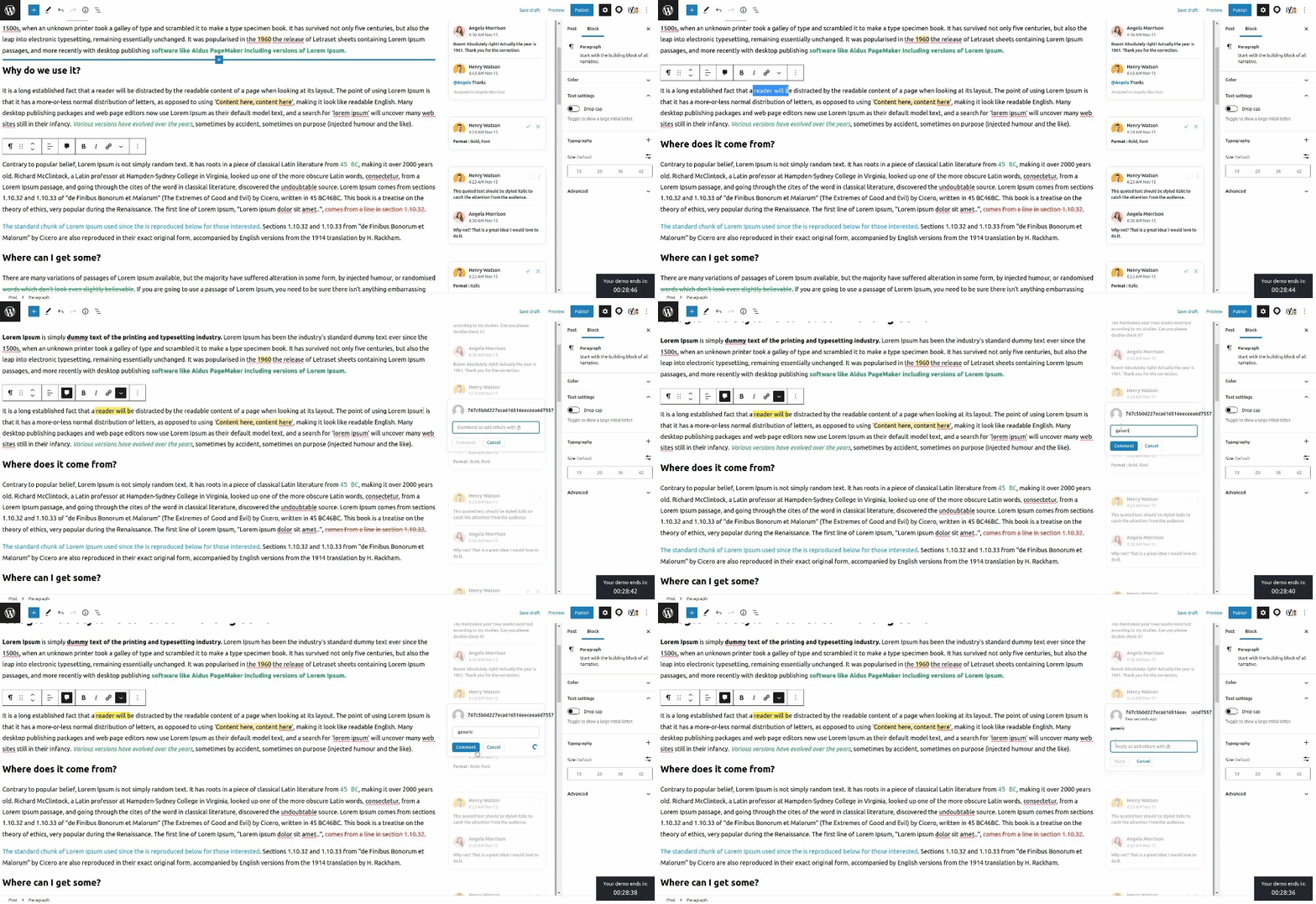
This reduces your dependency on third-party content editing tools while securing your organizational data as the complete editorial workflow will be shifted to WordPress.
Multicollab will help you publish content faster, 2x faster than Google Docs, to be exact, making it a must-have content management software for blogging and collaboration.
See how Multicollab compares to Google Docs for WordPress editorial teams.
Summing up
Content collaboration helps teams build adaptive and robust workflows that produce quality content faster. It saves time, increases productivity, improves employee engagement, and establishes trust and transparency among the team members.
For effective content collaboration, you should start by building a content production workflow that you can improve with time. You can gather suggestions from your team members by giving them access to accurate data and encouraging them to participate in decision-making.
The final piece for efficient content collaboration is the usage of the right tools. Your tools should be versatile, easy to use, and scalable while simplifying the content production process.
Multicollab is a content collaboration tool for WordPress teams that enables Google Docs-style co-editing in the Gutenberg Editor. It reduces the number of tools you need to cycle through while protecting your organizational data.
Ready to put this into practice? See how WordPress teams use Multicollab to manage their entire editorial workflow without leaving the Gutenberg editor.
If your team publishes on WordPress, begin by finding the right Multicollab plan.
FAQs:
1. What is content collaboration?
Content collaboration is the process of multiple team members — writers, editors, reviewers, designers, and stakeholders — working together to produce, refine, and publish content. It relies on defined workflows, clear role assignments, and shared tools to keep everyone aligned throughout the content lifecycle.
2. Why is content collaboration important?
Without a structured collaboration process, content teams waste time chasing approvals, lose feedback in email threads, and produce inconsistent output. Good content collaboration reduces revision cycles, keeps everyone working from the same version of a document, and ensures content moves from draft to publish without bottlenecks.
3. What are the main challenges of content collaboration?
The most common challenges are version control (teams editing different drafts simultaneously), feedback scattered across emails and chat tools, unclear ownership of review and approval stages, and security risks when content is edited in external tools outside the organization’s systems.
4. What tools are used for content collaboration?
Common tools include Google Docs and Microsoft Word for co-editing, project management tools like Asana or Trello for workflow tracking, and WordPress-native tools like Multicollab for teams that publish directly in Gutenberg. Multicollab brings Google Docs-style inline commenting and suggestion mode directly into WordPress, removing the need to shuttle drafts between external editors.
5. How is content collaboration different from content management?
Content management refers to how content is stored, organized, and published, typically handled by a CMS like WordPress. Content collaboration refers to the human process of creating and refining that content as a team. The two overlap when collaboration tools are built directly into the CMS, which is what Multicollab does for WordPress teams.
6. Can content teams collaborate directly inside WordPress?
Yes. Multicollab lets WordPress teams comment, suggest edits, assign tasks via @mentions, and track changes directly in the Gutenberg editor, without exporting drafts to Google Docs or Word. This keeps your editorial workflow and your organizational data inside WordPress.
Download a Free Actionable Guide: 45+ Actionable Tips to Optimize Performance for High-Traffic WordPress Websites
Performance Optimization Techniques: Speed up your site with caching, image compression, and code minification.
Hosting and Scalability Suggestions: Learn to choose the right hosting solutions and scale efficiently.
Security and Protection Guidelines: Safeguard your site from DDoS attacks, malware, and performance threats.
Content and Plugin Management Tips: Optimize your database, plugins, and themes for peak performance.