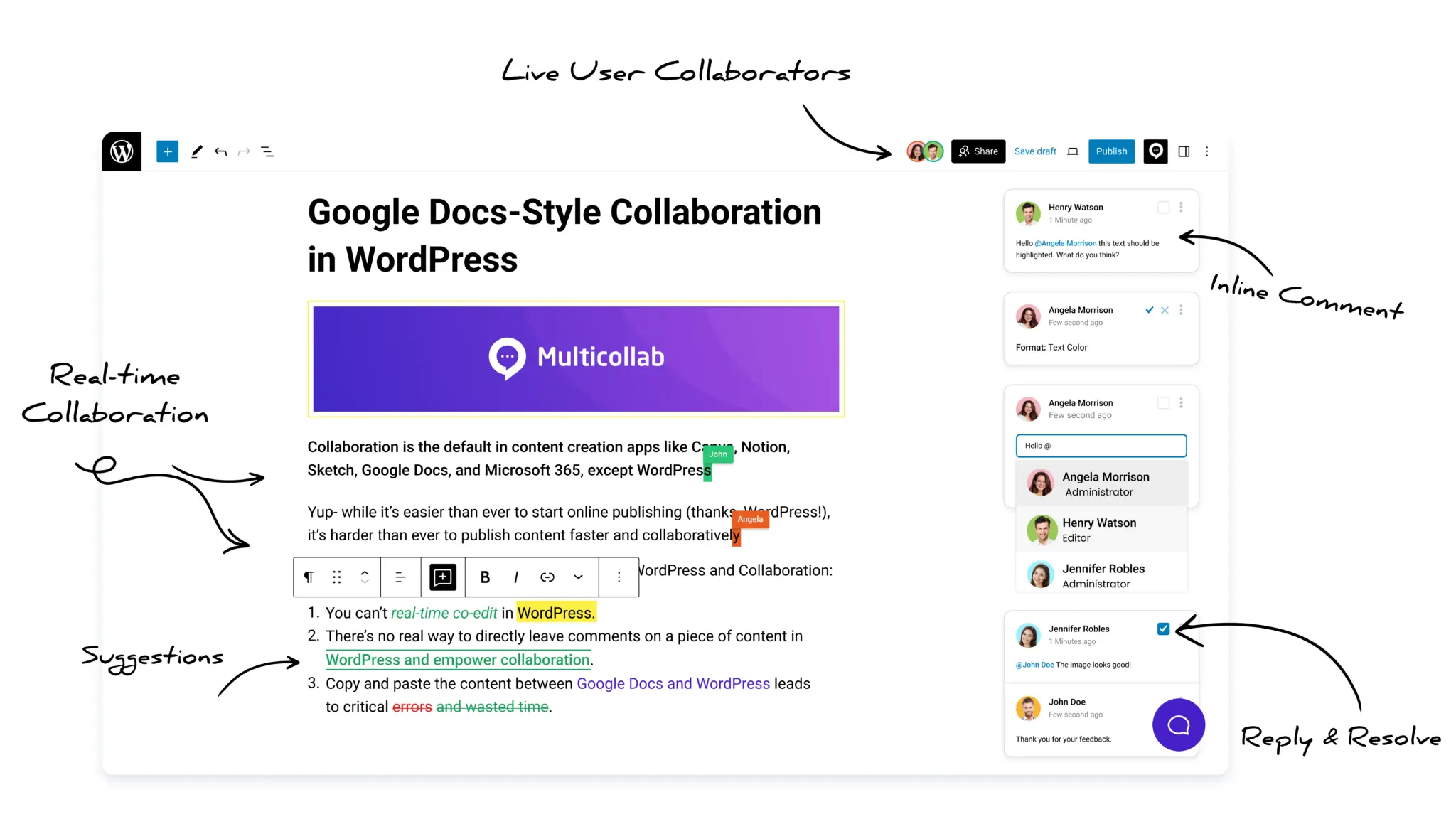


Table of Contents
WordPress has traditionally prevented multiple users from editing the same post at the same time. When one person opens a draft, another writer or editor may encounter a post-locking message and have to wait. For editorial teams working under tight deadlines, that delay can slow down writing, review, and publication.
WordPress real-time collaboration with Multicollab removes this bottleneck. It allows multiple team members to work on the same WordPress draft simultaneously and see changes as they happen.
Multicollab is a WordPress editorial collaboration plugin that brings real-time co-editing, inline comments, suggested edits, mentions, notifications, and review workflows into the Gutenberg editor. Its Real-Time Collaboration feature allows up to five users to edit the same post together while showing who is active and which block each person is editing.
Key Takeaways
- Multicollab allows multiple users to edit the same WordPress post or page simultaneously in the Gutenberg editor.
- Real-time collaboration supports up to five concurrent users on one post.
- Two collaborators cannot edit the same block at the same time, helping prevent conflicting changes.
- Real-Time Collaboration and Suggestion Mode cannot be active together.
- Multicollab 5.1 improved real-time performance and introduced instant comment syncing and live activity notifications.
- Multicollab 5.2 added controls for enabling or disabling real-time collaboration across all posts, selected posts, or specific categories.
This article was originally published in 2023. It has been updated to reflect Multicollab 5.2, including improved real-time editing performance, instant comment syncing, global collaboration controls, and the feature’s current limitations.
What is real-time collaborative editing in WordPress?
Real-time collaborative editing allows several people to open and edit the same WordPress post or page during one active session. Changes made by one collaborator become visible to the others without requiring everyone to work from separate copies of the draft.
This is especially useful when writers, editors, subject matter experts, or campaign teams need to work together during a live editing session. Instead of passing the draft between users or moving it into Google Docs, the team can continue working inside WordPress.
Native WordPress has historically relied on post locking to reduce the risk of one person’s changes overwriting another’s. That protection is useful, but it can create a queue when several people need to contribute. Multicollab adds a collaboration layer to the Gutenberg editor so authorized users can work in the same post without waiting for another person to exit.
How does WordPress real-time collaboration work in Multicollab
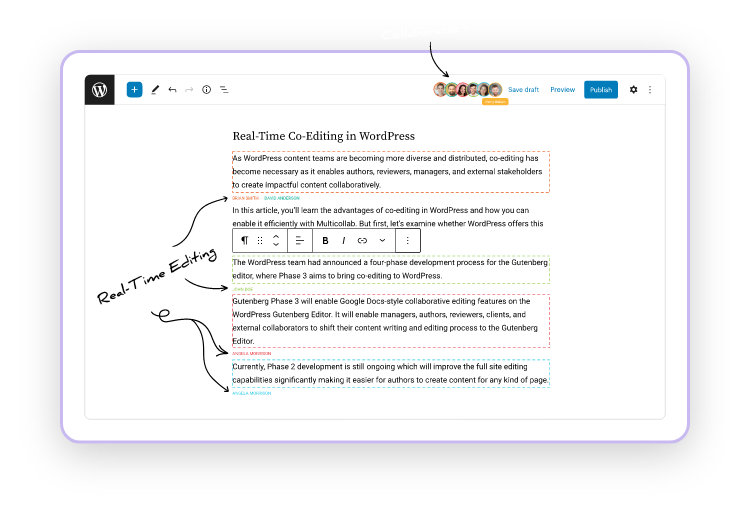
Multicollab’s Real-Time Collaboration feature allows multiple logged-in users to open and edit the same post or page at the same time. Collaborators can see who else is present and identify the block another person is working on.
Each person can work in a different part of the post. Changes appear during the active editing session, reducing the need to refresh the page, exchange revised files, or combine separate versions later.
The current feature includes several improvements that were not available when this article was first published.
Improved co-editing performance
Multicollab 5.1 improved Real-Time Collaboration performance to address lag and post freezes during live editing. This makes co-editing more reliable when several contributors are working in Gutenberg together.
Instant comment syncing
Comments and replies in the Multicollab sidebar sync across collaborators without requiring a page refresh. When an editor adds feedback during a live session, other participants can see the updated discussion and respond from the same draft.
Real-time activity notifications
Collaborators receive live updates for new activity on comment boards. This helps users notice new comments and replies while they are actively working on the post.
Global collaboration controls
Multicollab 5.2 introduced administrative controls for Real-Time Collaboration. Administrators can enable or disable the feature for:
- All supported posts
- Selected posts
- Specific content categories
These controls let editorial teams decide where live co-editing is useful instead of applying it to every piece of content.
Real-time editing, comments, and Suggestion Mode are not the same
Multicollab provides several ways to collaborate, but they support different stages of the editorial process.
Real-Time Collaboration is designed for synchronous work. Use it when writers and editors want to create, restructure, or polish a draft together during the same session.
Inline comments support discussion around specific text, images, or other supported content. Team members can add feedback, reply, mention colleagues, and resolve conversations without directly rewriting the affected content.
Suggestion Mode is designed for controlled review. Proposed additions and deletions remain visible so an editor can accept or reject them before they become part of the final draft.
Real-Time Collaboration and Suggestion Mode cannot currently be used together. A practical editorial process is to use live co-editing while developing the draft, then switch to Suggestion Mode for a formal review round.
Current limitations of real-time editing
Editorial teams should understand the following limitations before starting a live session.
A maximum of five concurrent users
Up to five users can collaborate on one post at the same time. For larger editorial teams, assign only the people who need to make live changes and let other stakeholders participate during a separate review stage.
Two users cannot edit the same block simultaneously
Collaborators can work in different blocks within the same post, but two people cannot edit the same block at the same time. This restriction helps prevent overlapping or conflicting changes.
If another user is working in a block, move to a different section or wait until that person has finished.
Suggestion Mode must remain separate
Real-Time Collaboration and Suggestion Mode cannot be active together. Teams should choose the mode that matches the current task:
- Use Real-Time Collaboration for live writing and editing.
- Use Suggestion Mode when proposed changes need to be reviewed and accepted or rejected.
Other Multicollab features that support live editing
Inline comments and mentions
Collaborators can select supported text or media and leave contextual comments directly in Gutenberg. They can reply to a comment, resolve the discussion, or mention a teammate whose input is required.
Email and Slack notifications
Multicollab can notify team members about mentions, replies, and other comment activity. Email and Slack notifications help bring a reviewer back to the relevant WordPress draft without moving the discussion into a separate document.
File attachments
Editors can attach supported images and documents to comments and replies. This keeps supporting material close to the section being discussed.
Activity tracking
The Multicollab Dashboard and Activity Center help editorial managers see recent collaboration activity across posts and pages. Multicollab 5.2 also introduced an updated dashboard interface for clearer navigation.
Custom permissions
Administrators can control which WordPress roles can add or resolve comments and accept or reject suggestions. These permissions help teams keep editorial responsibilities aligned with existing WordPress roles.
How to enable real-time collaboration in WordPress
Real-Time Collaboration is available in Multicollab Pro. It is not included in the Multicollab Lite plan.
After installing and activating the current premium version, an administrator can enable the Real-Time Collaboration module from the Multicollab settings.
With Multicollab 5.2, the administrator can then decide whether live editing should be available for all posts, selected posts, or particular categories.
Before beginning a live editing session:
- Confirm that every collaborator has the necessary WordPress access and permissions.
- Make sure Real-Time Collaboration is enabled for the post or its category.
- Confirm that Suggestion Mode is disabled for the session.
- Ask collaborators to work in separate blocks to avoid editing conflicts.
- Use comments or mentions when a change needs discussion before it is made.
Once the configuration is complete, authorized users can open the same post in Gutenberg and begin working together.
Benefits of real-time collaboration for editorial teams
Reduce waiting caused by post locking
Writers and editors no longer need to wait for another user to leave the draft before contributing. Several people can move the post forward during the same working session.
Keep writing and editing inside WordPress
The draft does not need to move repeatedly between Google Docs and WordPress. This reduces context switching and the risk of losing comments, links, formatting, images, or the latest revision during copy and paste.
Make live review sessions more productive
During a live review, team members can work in different parts of the post while discussing questions through inline comments. Changes and feedback remain connected to the WordPress draft.
Reduce version confusion
Because collaborators work on the same post, the team does not have to merge separate documents or determine which file contains the most recent changes.
Support distributed editorial teams
Remote writers, editors, and subject matter experts can join the same WordPress editing session without sharing files through several external tools.
Work on WordPress drafts without waiting for editor lockouts
Real-time collaboration allows writers and editors to work on the same WordPress draft without transferring the content to another platform or waiting for another user to leave the editor.
With Multicollab, up to five collaborators can edit a post together, view live changes, exchange synced comments, and see where other users are working. Administrators can also control which posts or categories allow real-time editing.
Use Real-Time Collaboration for live writing sessions. When the draft enters a structured review stage and every proposed change needs approval, switch to Suggestion Mode. Using each feature for the appropriate stage helps the editorial team move faster without giving up control over the final content.
Explore Multicollab’s collaboration features or try the live demo.
Frequently asked questions
Can multiple people edit the same WordPress post simultaneously?
Yes. Multicollab’s Real-Time Collaboration feature allows multiple authorized users to edit the same WordPress post or page simultaneously in the Gutenberg editor.
How many users can edit one WordPress post in real time?
Multicollab currently supports up to five concurrent users on a single post.
Can two users edit the same Gutenberg block at the same time?
No. Two users cannot edit the same block simultaneously. They can work in different blocks within the same post, which helps prevent conflicting changes.
Do collaborators need to refresh the post to see changes and comments?
No. Changes appear during the active editing session, and current versions of Multicollab sync new comments and replies across collaborators without requiring a page refresh.
Can Real-Time Collaboration and Suggestion Mode be used together?
No. These modes cannot currently be active together. Use Real-Time Collaboration for synchronous writing and editing, then use Suggestion Mode separately for changes that must be accepted or rejected.
Is real-time editing available in the free version of Multicollab?
No. Real-Time Collaboration is a Multicollab Pro feature and is not included in the Lite plan.